TNI informs us that PSQTOOLS, the toolset for the PlaySoniq module has been updated! Three new tools have been released: PSQSAVE and PSQLOAD, to save and load PlaySoniq module settings and SMSLOAD, a tool to load and run Sega Master System ROM images. SMSLOAD also supports Sega SC-3000 and SG-1000 rom files, when the correct extension (e.g. name.sg) is given at the command line. Grab them at the TNI site: www.tni.nl
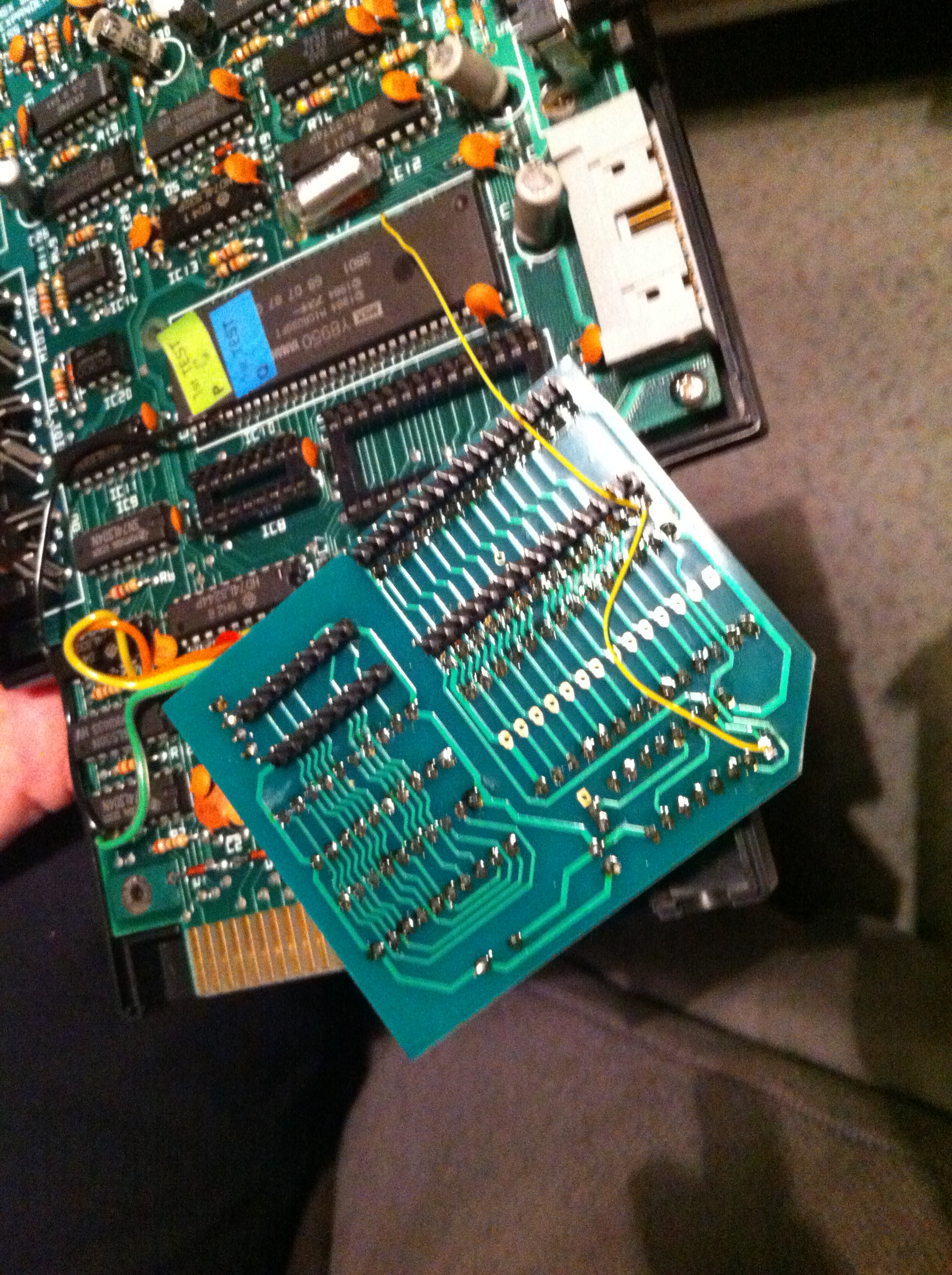
Some users have asked us how to modify the Philips Music Module expander to support the new MSX Audio Rom 1.3 made by Brazilian MSX user FRS. This new bios has quite some new features like better MSX-Music instrument support and support for games that make use of the MSX-Music (FM-PAC) bios. A lot of ASCII MSX-Music now work! Please follow the FRS page link later on in this article for the release notes. We have tested this new rom with our expander and indeed some modifications needs to be done. Although those modifications are not complicated to do at all.
First you have to remove the yellow wires on the bottom of the expander:
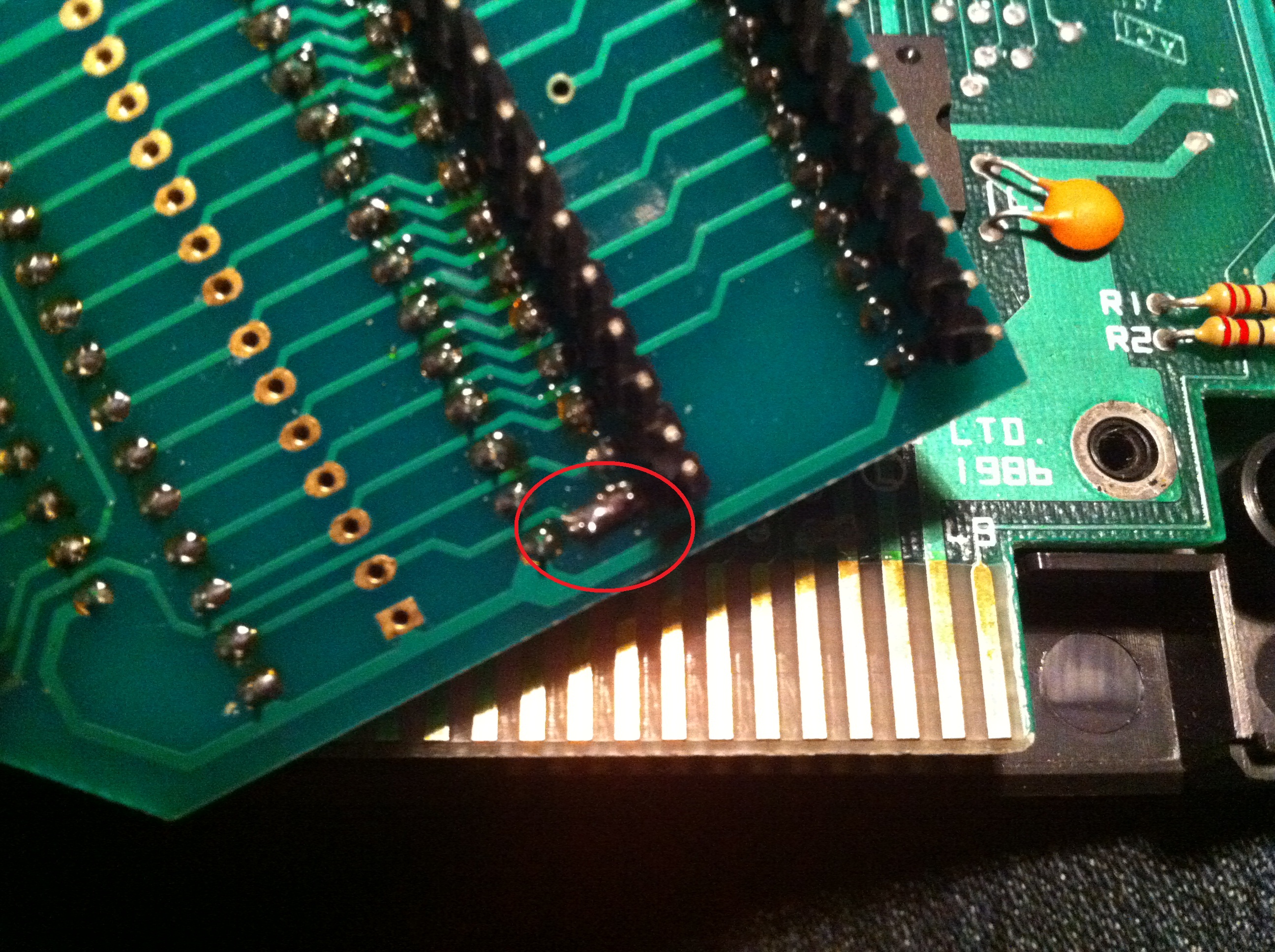
Then you have to connect jumpers labeled 2 and 3 on the expander board. See below for the example (done on the bottom of the expander)
And this is all you have to do! Please note that the new MSX Audio bios from FRS does not include the original Philips software.
The latest bios from FRS can be downloaded at his homepage, in the tools section: http://frs.badcoffee.info/tools.html
You need the file msxaudio13.NMS-1205.rom from the MSX Audio Bios v1.3 zip package. Please contact Bas at www.bas-ditta.info if you need help obtaining a new flashed rom. If you own a Music Module and want better support for games and music, please note that we still have a few MSX Audio Upgrade boards left.
Unfortunately we could not attend the latest MSX meeting held by AAMSX in Barcelona due to an unexpected strike of the air traffic controllers in Spain. Luckely Spanish MSX user Salva managed to bring his PlaySoniq to the party so at least visitors could take a peek. Thank you Salva for demoing the PlaySoniq. We did however manage to attend the nice MSX Info Party in Helsinki last August and made a small video of the PlaySoniq in action for you to enjoy.
Last Saturday, the monthly MSX Mariënberg meeting was held. We still had all the PlaySoniq, MIDI-PAC and MSX gear in boxes due to the Bonami retro fair that was held one week before. So we could easily also show a little demonstration in Mariënberg.
At the Bonami fair, people liked the PlaySoniq and the MIDI-PAC. For the PlaySoniq we had to convince people that it was actually a MSX that was playing Sega games. For the MIDI-PAC we’ve got questions about which CD’s we were playing (while we actually were demo-ing MSX games). This was also partly due to Tjeerd bringing his Yamaha XG wavetable MIDI module. Which actually blows away our simple Yamaha TG-300 tone generator.
Over the last weeks, we also managed to let the PlaySoniq work together with the MIDI-PAC.There are about 64 Sega Master System games with support for OPLL (the same chip as in the MSX Music standard or the FM-PAC has). Since the PlaySoniq can reroute that music and sound effects to the MSX, the MIDI-PAC can pick those up too and convert that to MIDI data on the fly. In short: with the PlaySoniq and the MIDI-PAC combined, you can also enjoy your SMS-FM games with your MIDI equipment. Try that with a Master System Console 😉
We recorded a little video at Mariënberg to show the MIDI-PAC and the PlaySoniq working together. A big thank you to Filip Slagter who was willing to demo YS2 FM and Scramble Spirits on the PlaySoniq and MIDI-PAC combined. And Firehawk with the MIDI-PAC. we hope you like this video. But keep in mind that this demo was recorded with a phone (and the TG-300). A lot of the lower frequencies in the bass and drums sounds are therefore missing in the sound output.
Some users report that their FM-PAC is not working with the PlaySoniq. Others report that the joysticks are not working. For FM-PAC support you first have to activate the FM-PAC. After typing CALL MUSIC (or add this enty in the sega.bas file) everything works. Albert Beevendorp wil release a tool with which you can activate the FM-PAC from MSX-DOS. We hope to make this available soon. For joystick support you also have to edit the sega.bas file. By default only the keyboard is active. To change this, change line 120 by entering ‘ 120 OV=4 ‘ and save “sega.bas” again. Please note there’s an overlay matrix in the manual were you can check which option best suits your needs, or the game you want to play. PCEFAN reports that overlay code 3 works best in most situations. Just try and check the results for your configuration.
If you experience soft SCC sound, there a few ways around this. First of all, there’s a volume adjuster on the PCB which you can adjust to balance the SCC mixing. Please check the manual for details. To get full control over the audio mixing, also for mixing OPLL sounds with PSG, MSX with PlaySoniq and our upcoming MIDI-PAC we bought a Behringer VMX-300 3-Channel audio mixer. These can be picked up for about 50 euros at local or webbased trade-in markets. New it’s about 120~150 euros. We got ours for 50.
You can see the VMX-300 and the MIDI-PAC prototype in action here:
Tjeerd of WORP3 informed us that developments on the MIDI-PAC go well. And he wanted us to hear the progress already. Please note that the algorithms to convert MSX Music to MIDI out commands are still being tweaked. The software to create mappings for MIDI instruments is also still under development. In the mean time please enjoy the following recordings (made with a Roland Sound Canvas SC 55):
Of course, in the end the final quality of the sound output will be determined by your equipment and instrument presets made.
Update October 2010: Please note that these audio files are in not representative anymore. The current quality that the MIDI-PAC can deliver is way better.
We just found out at the MRC that Kralizec is releasing their new game “Goonies ‘R Good Enough’ on the next 37th MSX users meeting in Barcelona, which will be held on June 19th in Barcelona. The first 35 buyers will get an official Goonies badge and a poster. The game is priced at 35 euro and the cartridge also contains a SCC and PSG in FPGA. Apart from being a great game, the best news is of course that this game also supports the MSX1 compatible screen mode of Franky ;-). Which could be nice for those users who have Franky and a MSX1, but no RGB output on the MSX1. It’s also great for testing your Franky card.
The game can also be ordered from the MSX cartridge shop and Sunrise if you are unable to attend the meeting. Check Kralizec at the MSX cartridge shop for details.

 supersoniqs